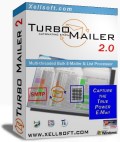



Turbo Email Answer - Answering Software & Autoresponder
Leading Software for effective interactive Email Answering driven by smart text template and auto-responding. Integrates seamlessly with your normal email client(s).
Free to Try | US$24.90 | For Windows™
|
|
|
Speeds up daily interactive email answering by smart text templates |
|
|
|
Auto-responder with smart email detector/filter |
|
|
|
Windows hotkey access to reusable text snippets |
|
|
|
Versatile macro automation options (built-in Python script language) |
|
|
|
Seamless integration of
multiple inbox'es and e-mail clients |

You have to answer lots of emails? Text patterns repeat?
Turbo EmailAnswer has shown to speed up daily business email handling by more than 300%. Turbo Email Answer reduces email support costs significantly and streamlines your email communication channel. Extra care has been taken to enable fine-grained automations and provide an optimal high-speed user interface: Type the beginning letters of key names to trigger certain reply templates. Auto-shift an answered email to a pre-defined target folder. Pre-classify incoming mails to the most probable template. Schedule specific mails for auto-response. TEA’s text templates are hotkey responsive throughout Windows and convert smart variables, macro expressions or even recursive template inclusion. A complete built-in Python macro language finally unlocks advanced automation power. For example you can even wire ODBC/SQL database queries to your fingertips. TEA integrates multiple email inbox’es and email client systems: MS Outlook, Outlook Express, Eudora, any MAPI compliant mailer, native POP/SMTP and IMAP. Works also perfect within workgroups.
Features:
-
Keyboard triggered answer & forward templates
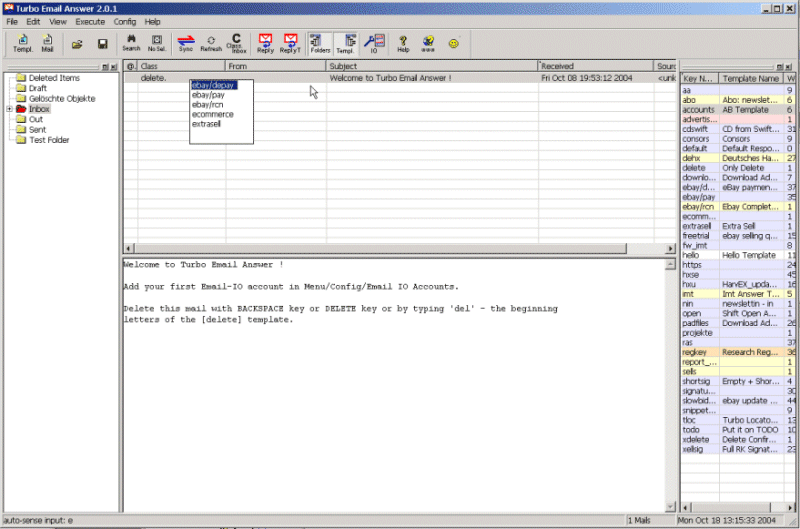
Answer templates can by triggered quickly simply by typing the beginning letters of template's key-names while you are in the inbox or in the email pre-viewer. E.g.: you have the cursor in the inbox list on a mail | You see its a certain question regarding your eBay product | Type the beginning letters of a template name like "eb" for "ebike" and the prepared answer is presented in your email editor. After editing and sending the answer you can simple confirm to shift the original email to a certain folder -
Automatic text pre-classification to "best" template
Mails can be pre-classified to a "best" template by matching the text-body/subject/From/To-Address against word patterns or even by analyzing the text with more complex macros. -
Full-automatic autoresponder (with simulation mode)
Any answer templates can be set up for auto-response. E.g. incoming mails with certain word patterns in Subject/From:/TextBody trigger the best matching template for a full-automatic (computed) responses -
1-click template-to-clipboard-copy
In TEA simply make a single mouse click on a template (in the list) --> the template text body (snippet) is in the windows clipboard -
Global Windows hotkey for template-to-clipboard-copy
Press e.g. Ctrl-F10 while working in any application like Winword. A small selection drop-down appears: type beginning letters of template name. The template text body goes as text snippet to the Windows clipboard. Paste it in your document with Ctrl-V -
Template driven shift to archive folders
Each answer template can define a target folder: Answered or non-answered emails are archived to the target folder (confirm option) -
Template grouping & keyboard triggers
A shot key sequence like e SPACE p triggers a template with short name "ebay/payment". The slash in keynames enables to sub-access whole folders of templates -
Answer templates support smart text/html-variables and attachments
Template text bodies and subjects can contain variables like %FromName% to insert data of the original mail or even macro computed values (e.g. taken from a database). Attachments can be added by a flexible macro function. -
Recursive template inclusion (e.g. for smart signatures and ads)
Answer templates can include text of other templates. Thus you can maintain variable signatures, sub-templates, changing advertisements at the bottom, etc. ) -
Answer & Forward processing
-
Mass handling of multiple selected mails with the same template
-
Mass handling of pre-classified mails
Trigger pre-classified templates py pressing 2 x SPACE key on selected mails -
Supported Email IO / Super-Inbox for:
-
MS Outlook: Extended integration incl. shifting answered mails to Outlook's own folder tree, using Outlooks normal mail editor etc.
-
MS Outlook Express: incl. using OE's normal mail editor.
( Shifting to OE's folder tree : available soon: OE Extended Integration
)
OE Extended Integration
) -
Eudora, Mozilla, Netscape (MAPI interface)
-
Any other MAPI enabled email client software
-
Standalone POP/SMTP client is built-in
-
Standalone IMAP/SMTP client is built-in
-
-
Handles Text & HTML mails
-
Macro computed answers
Macro computing of answers is another option in addition to fixed templates and simple variable personalization -
Advanced macro automation
Incl. interface options to files, ODBC / SQL, importing Python modules, etc. -
User defined GUI input form dialogs
Answer macros can use additional user input from GUI form; Thus you can e.g. include product data, IDs for querying databases quickly etc. in your mails -
Well designed for minimum user interaction
TEA is well thought out to minimize the amount of key-pressing, clicks, etc. -
Internal backup and auto-save system
Auto-cycling backup of your valuable templates and the email archive database. Backup can e.g. rotate on 10 archive versions. -
Lots of extra ideas and tricks to improve efficiency
Turbo-Email-Answer is free to try: Download
Free Trial ::  (1.9MB)
Newsletter
Order a free newsletter to be informed about updates, improvements, tips & tricks. Your data is not used for other purposes.
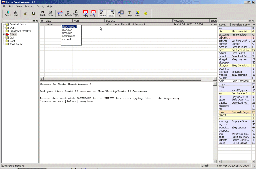
Screenshot
Download / Software Update
The current release is v2.1: EmailAnswer-Setup.exe
(1.9 MB; Windows).
Later releases can be simply installed over existing ones (previous
uninstall not necessary). Updates are free within major release 2.
TurboMailer can be run as free trial. Unless registered, there is a limit in the number of email addresses for transmission. The free trial period is 14 days.
Feel also free to feedback@xellsoft.com.
Buy Turbo Email Answer
Turbo Email answer has to be purchased after a trail period of 14 days. After registration the software works without the free-trial restriction (maximum number of addresses).
Purchasing a Turbo Email Answer license includes:
-
A license key for using of Turbo Email Answer on one machine for unlimited time
-
Email support ( Extra support email address provided )
-
Free software updates throughout the major release 2
Buy through PayPal:
Price :: US $24.90 / € 24.90. ::  [$] /
[€] (Credit card or PayPal account)
[$] /
[€] (Credit card or PayPal account)
Buy through ShareIT:
Price :: US $24.90 / €24.90. ::  ( Most payment methods )
Delivery: The registration key is delivered by email immediately after validation of payment.
Buy Multiple Licenses of Turbo Email Answer
We offer multiple licenses at reduced prices for companies and organizations. The setup of multiple licenses can be automated in order to facilitate software deployment in your organization.
| Number of licenses | Turbo Email Answer Price [US$] per user |
Turbo Email Answer Price [EUR] per user |
| 1 .. 2 | 24.90 | 24.90 |
| 3 .. 9 | 20.00 | 20.00 |
| 10 or more | 17.00 | 17.00 |
This multiple license fees are automatically applied when ordering over ShareIT here:
Buy multiple licenses of Turbo Email
Answer:
For other methods of ordering multiple licenses
please contact sales@xellsoft.com.
System Requirements
- Windows 98/ME, NT, 2000, XP, 3000, Vista, 7 or higher (32bit or 64bit)
- 100Mhz processor or faster
- 128MB RAM
- 20MB free disk space
- 800 x 600 display
Exits
- Xellsoft HarvEX - eBay automation software
- Xellsoft SynchronEX - File Synchronizer, backup and FTP automation software
- Xellsoft Custom Software